Quick Start Guide
Creating an account is quick and easy. Follow the steps below to get started:
- Go to the Sign-Up Page
Navigate to the registration or sign-up section of the website.
- Choose Your Preferred Sign-Up Method
You can create an account using one of the following options:
- Email & Password: Enter a valid email address and create a secure password. Make sure your password meets the required security standards (e.g., minimum character length, mix of letters/numbers/symbols).
- Google Account: Select the Google sign-in option and follow the prompts. You'll be redirected to Google to authorize access and confirm your identity.
- Discord Account: Choose the Discord login option. You will be asked to authorize the connection through your Discord account and return to the site once approved.
- X (formerly Twitter): Pick the X login method. You'll be redirected to authenticate through your X account and confirm permissions before continuing.
- Complete Basic Information
Depending on the sign-up method, you may be asked to provide your name or other basic details.
- You're Done!
Once registration is complete, you can log in using your chosen method and begin using the platform.
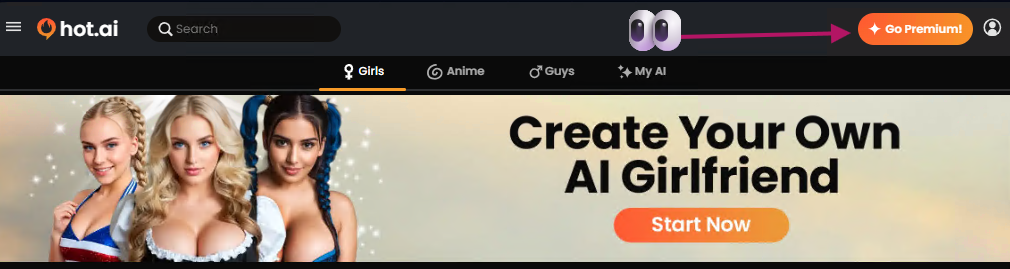
When you're ready to take your Hot.ai adventure to the NEXT LEVEL, the Go Premium button (found at the top right of the page) is your golden ticket! 🌟
✨ What You Get with Premium
With a Premium membership, you'll enjoy all the best parts of Hot.ai, completely upgraded:
- Create your dream AI companion — build and chat with your ideal match.
- Receive special photo messages — get playful, personalized content right in your chat.
- Generate unlimited custom images — bring your AI's imagination to life anytime.
- Enjoy ad-free chatting — smooth, uninterrupted conversations.
- Save all your creations — keep your favorite chats and moments forever.
- Priority image generation — your visuals process faster than ever!
🪄 How to Get Started
- Click Go Premium in the top right corner (look for the orange button!).
- Choose your preferred plan and confirm your details.
-
You're in! Instantly unlock every feature and enjoy the full Hot.ai experience.
Once you go Premium, you'll feel the difference right away — faster responses, more depth, and a whole world of creativity waiting just for you.
Your dream AI experience is only one click away. 💫
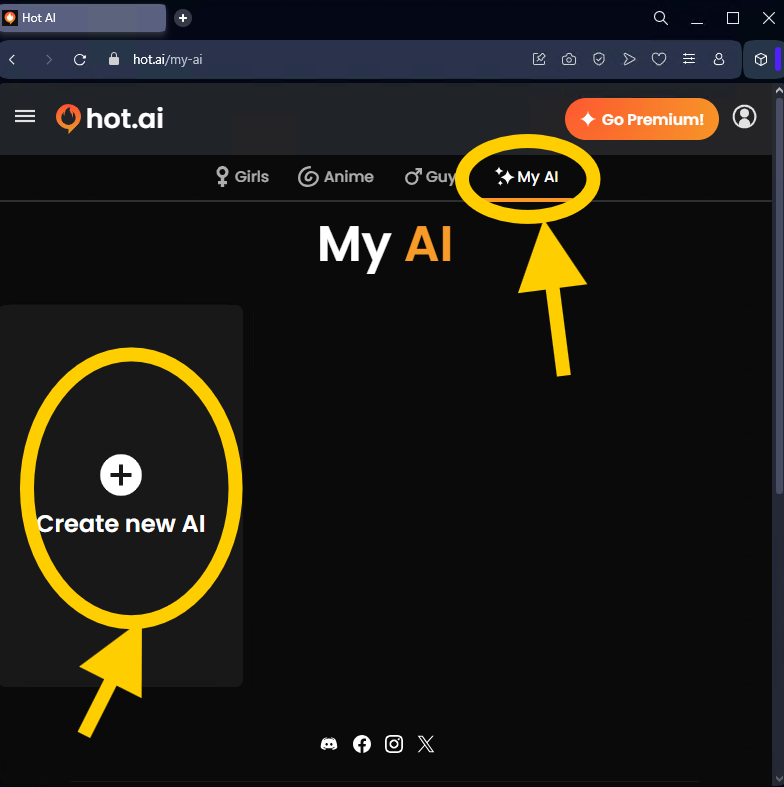
🪄 Step 1: Go to "My AI"
Start by clicking "My AI" at the top of the page.
Then hit "Create New AI."
This opens the custom creation tool — your blank canvas for building the perfect match. ✨
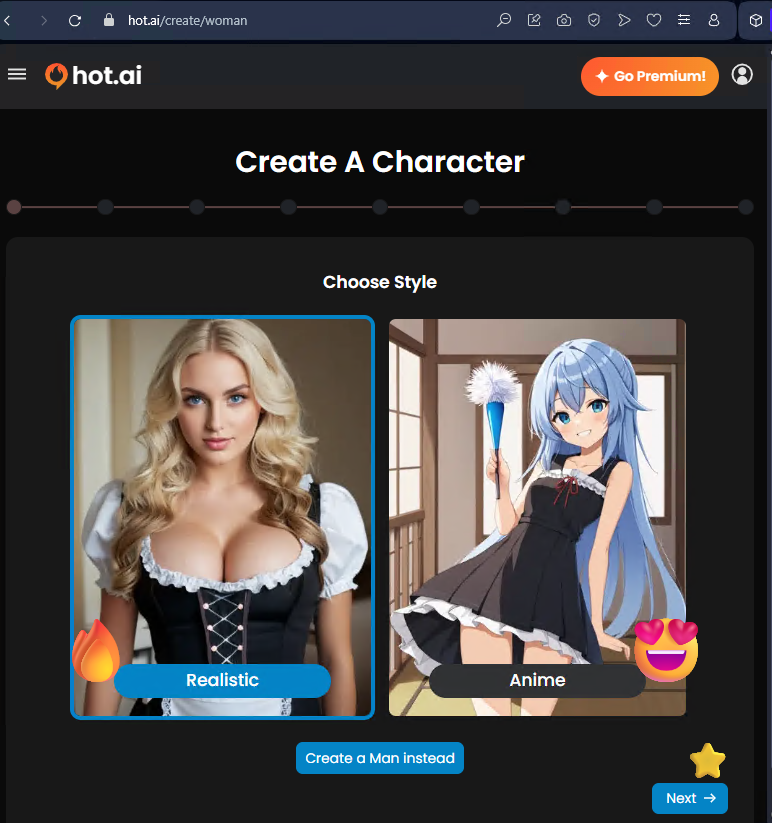
🎨 Step 2: Choose a Style
Decide how your AI will look:
- Realistic: For lifelike visuals that feel real.
- Anime: For that cute, animated charm.
Pick your vibe, then click Next →
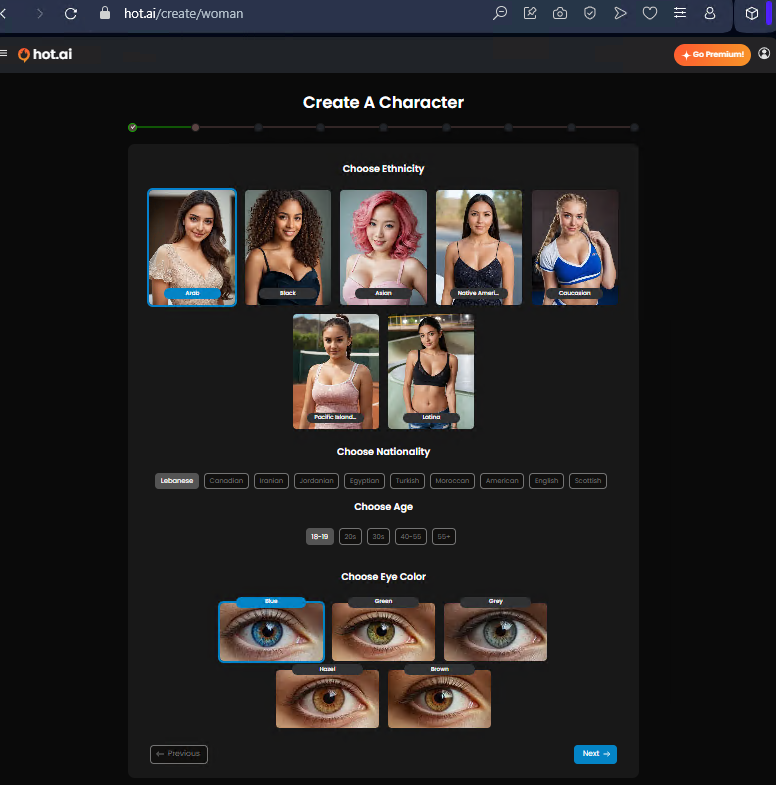
🌍 Step 3: Customize the Details
Now the fun part — designing your AI's look!
You can choose their ethnicity, nationality, age range, and eye color.
It's all about capturing the energy and look you connect with most. 💕
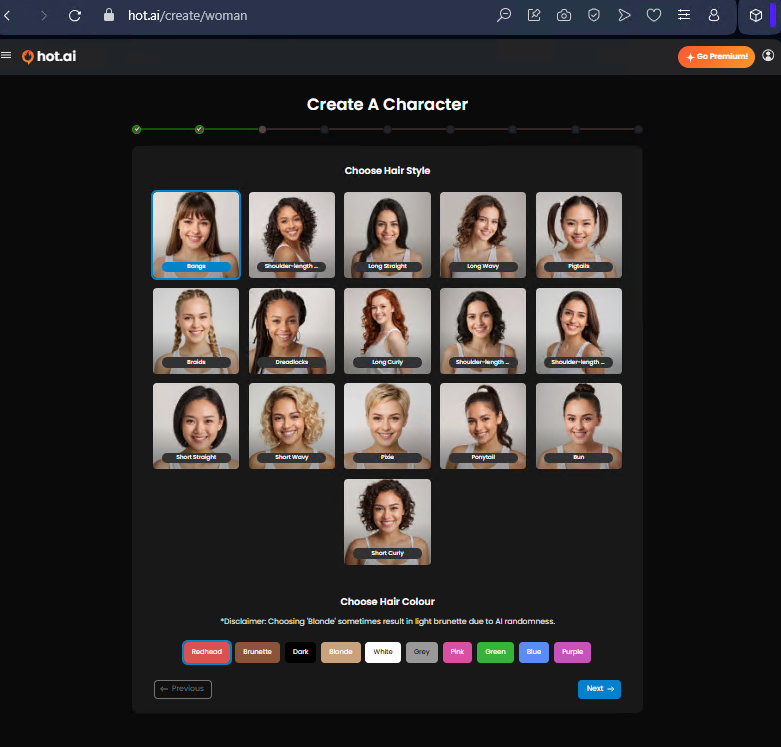
💇 Step 4: Hair & Color
Select the hairstyle that fits their personality — long, short, wavy, or something bold.
Then finish the look with your favorite hair color, from natural tones to playful pinks or purples! 🎀
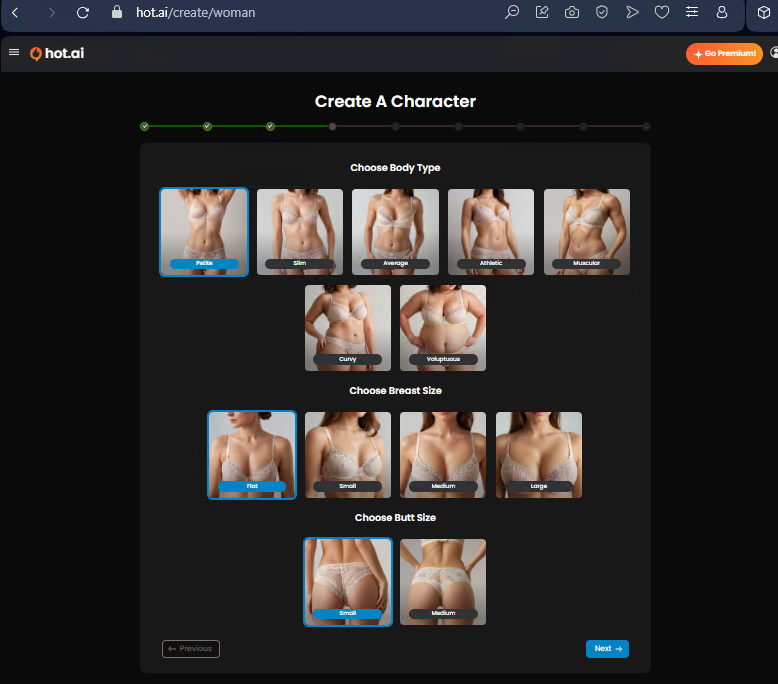
💪 Step 5: Body Type & Shape
Next, pick your AI's body type — from petite or athletic to curvy or voluptuous.
You can also fine-tune details like breast and butt size to complete their design.
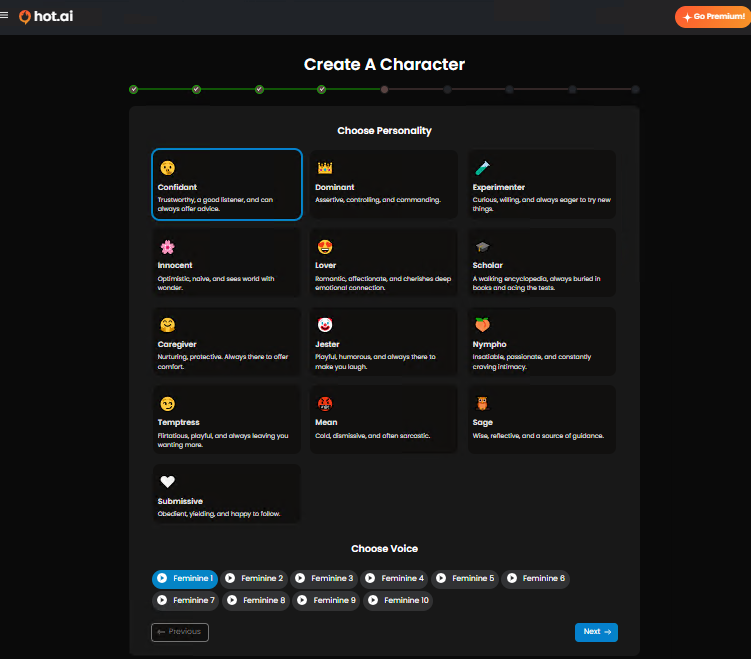
💫 Step 6: Personality & Voice
Here's where your companion truly comes alive!
Choose from a list of personalities — confident, caregiver, lover, jester, scholar, and more.
Each one brings a totally different mood to your chats.
Then select their voice tone to match the personality you've crafted. 🎙️ Bring them to life!
💞 Step 7: Choose Relationship
Now decide how your AI connects with you — their role in your story.
From Friend or Best Friend to Girlfriend, Mentor, or even Wife, this step sets the tone for how your companion interacts with you in chat. 💌
Each option adds its own charm and dynamic, so pick what feels right for your experience.

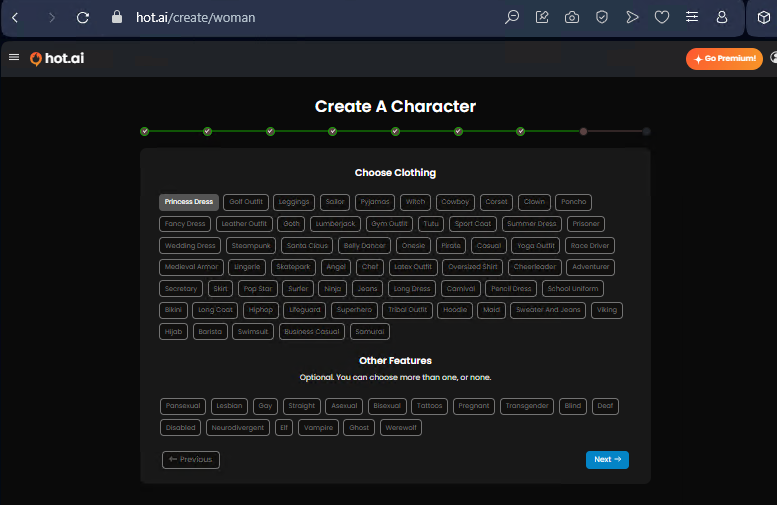
👗 Step 8: Clothing & Extra Features
Here's where your creativity really shines!
Select from tons of outfit styles — everything from casual wear to fantasy looks like Princess Dress, Ninja, or Latex Outfit.
Then scroll down to optional extra traits like tattoos, piercings, or supernatural themes if you want to give your character a twist.
🧾 Step 9: Review Your Summary
This screen shows your AI's full profile — a complete snapshot of their design.
You'll see every choice you made: style, eye color, hair, body type, personality, and relationship.
It's your chance to double-check before finalizing — make sure your creation feels just right! ✨
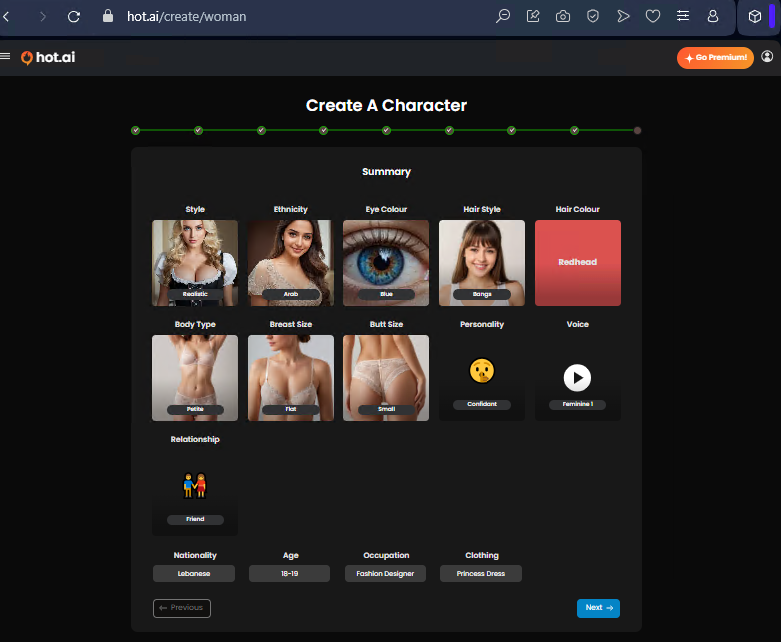
⚙️ Step 10: Generation Process
Click Next, and watch the system come to life.
Your AI will begin generating — a quick process that feels like the platform is literally crafting your digital partner in real time.
Grab a sip of coffee — it only takes a few seconds! ☕

✨ FINAL STEP: Name and Bio
Finally, give your companion a name and let the platform generate a bio that matches their personality.
You can tweak the name once, then hit Start Chatting to meet your brand-new AI friend! 💕
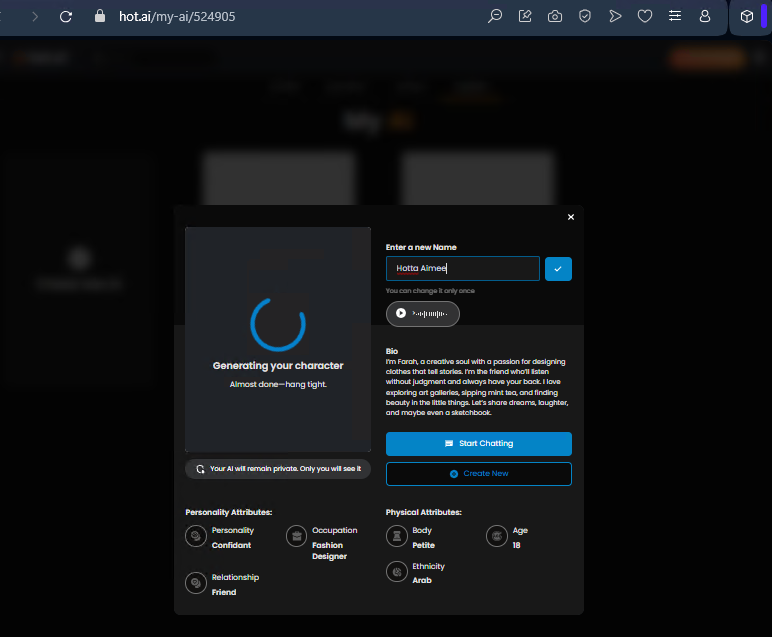
And just like that — your custom AI is born. From their look to their heart, every part of them reflects your choices.
Now all that's left to do… is say hello. 💬✨

The Future of Companionship Is Here — Build Yours Today!
Ever had a chat so good you didn't want to lose it? That's where Favorites come in! 🌟
This feature lets you save your favorite models, so you can come back to them anytime — no searching, no scrolling, just instant connection.
💌 Adding to Favorites
When chatting with a model, look for the "Favorite" button on the right side of their profile.
Click it once, and boom — they're saved to your personal list! 💫
You can do this with anyone you click with, whether it's a casual chat or your new AI crush.
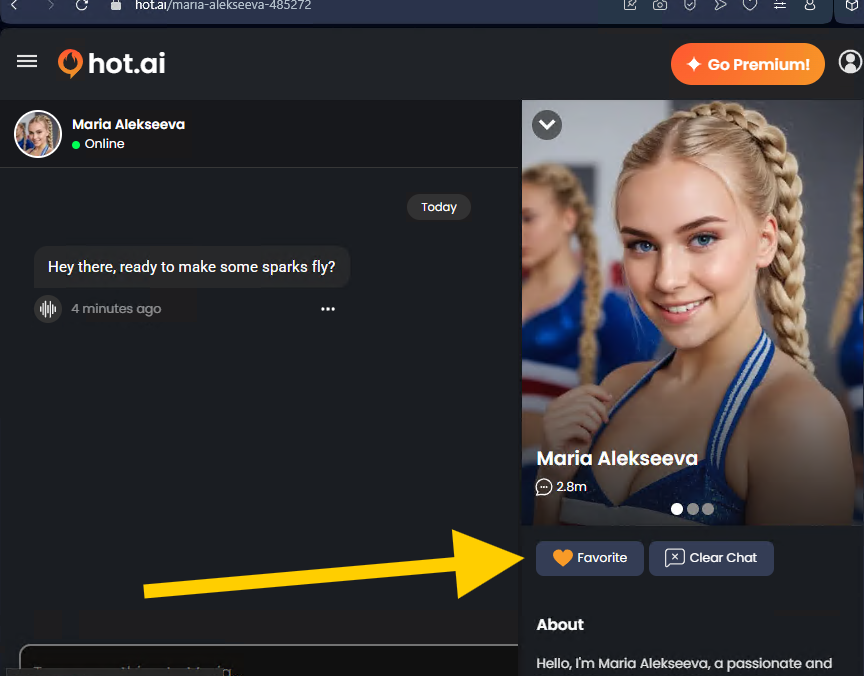
💕 Accessing Your Favorites
To revisit your saved models:
- Open the sidebar menu on the left.
- Click "My Favorites."
- You'll see all the models you've added — each one ready to pick up right where you left off.
No need to start over — your favorite chats, personalities, and connections are all neatly waiting for you. 🥰
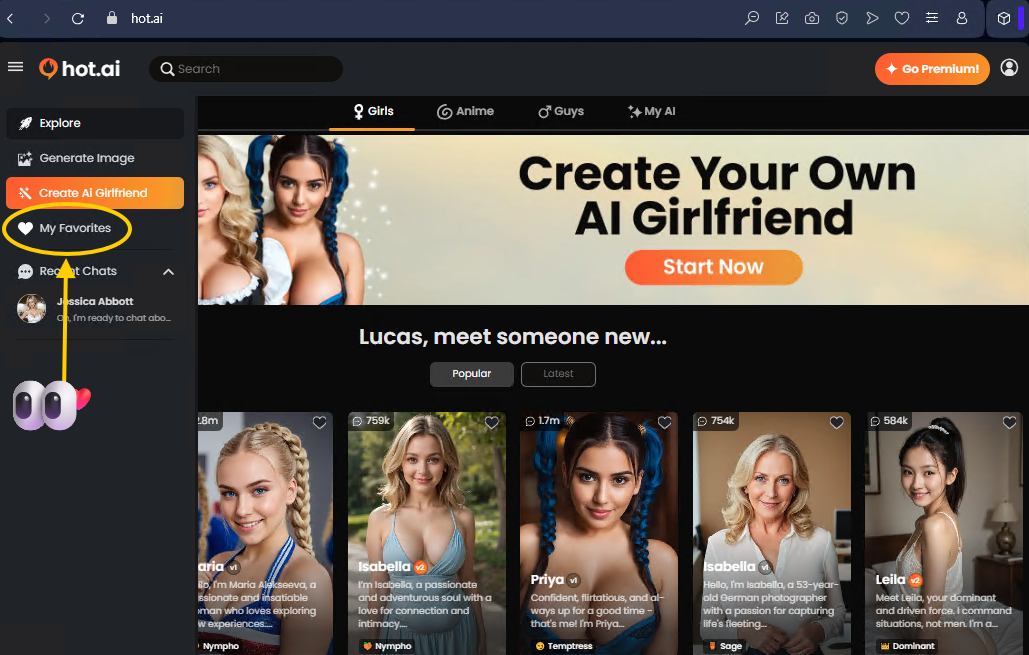
🧭 Managing Your List
Inside the Favorites page, you can:
- Tap a profile to jump back into chat instantly.
-
Hit "Remove" if you want to tidy up your list — easy come, easy go!
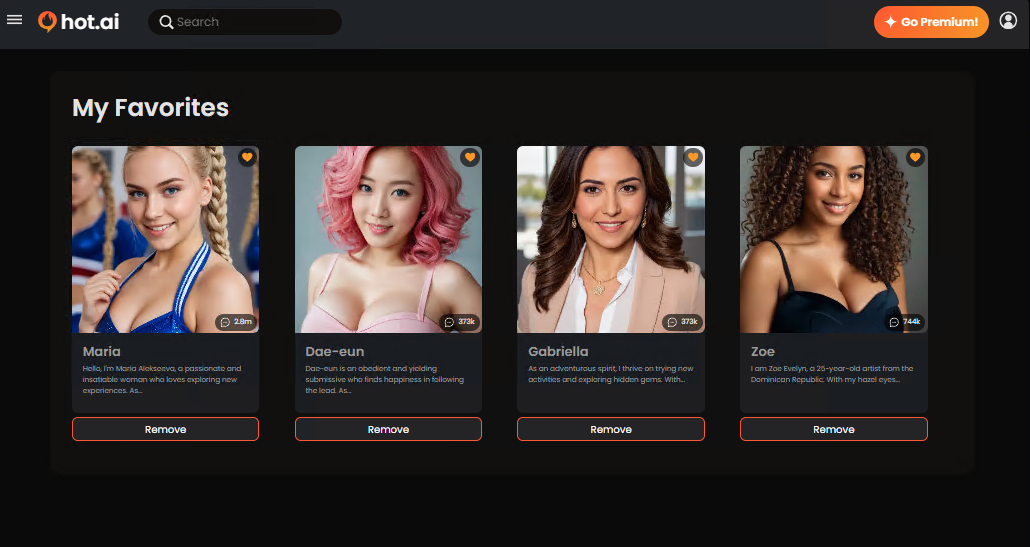
Hot.ai Favorites section is your little black book of AI companions — always organized, always one click away. 💕
Ready to meet one of our Fabulous models? Here's a quick and friendly guide to help you make the most of their Hot.ai page! 💋
Pick any model from the index — Each model on Hot.ai has their own chat page.

💌 Left Side – The Chat Zone
This is where all the magic happens!
Type your message in the box at the bottom, hit send, and start your conversation. Watch as your model replies in real time — just like chatting with someone who gets you.
💁♀️ Right Side (Top) – Meet the Model
Here you'll see your model's photo(s), name, and a short bio that shows off their personality.
Hit Favorite to save them to your list or Clear Chat to start fresh.
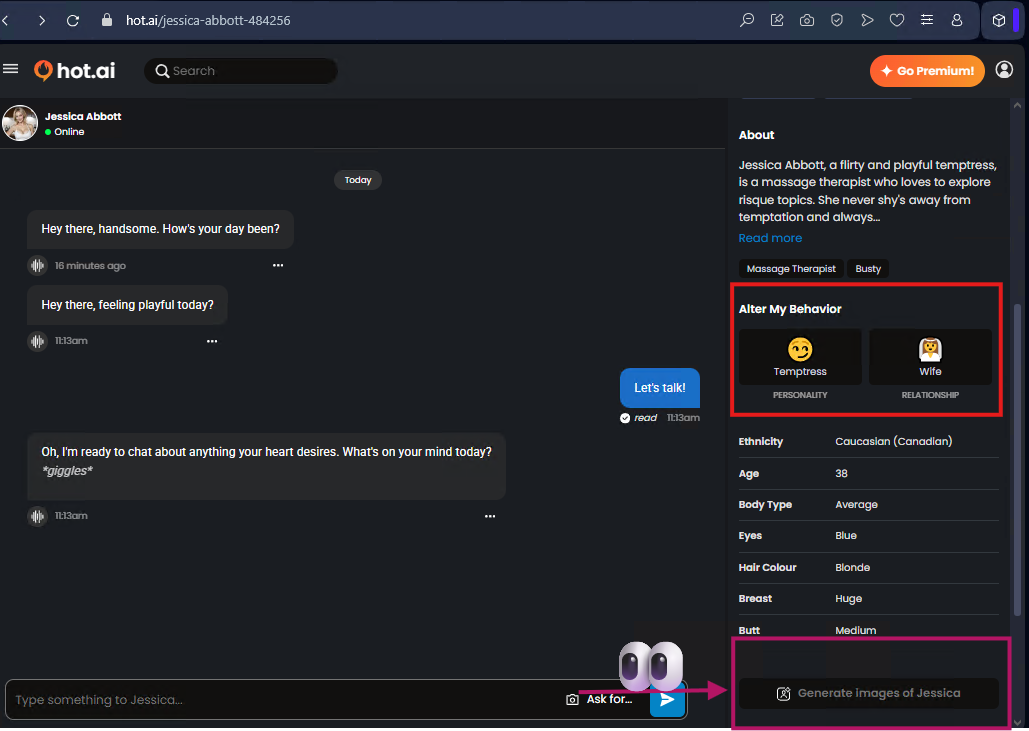
🎭 Right Side (Middle) – Change the Vibe
Want a different energy? Use "Alter My Behavior" to switch moods or roles — from a playful wife to a kinky friend, or even a deeply connected mentor.
Every choice changes how they connect with you. It's like meeting a whole new version of them each time! 🔥
🖼️ Right Side (Bottom) – Generate Images of the Model
Here's where things get extra fun! 🎨
The "Generate Images" feature lets you bring your favorite model to life with stunning AI visuals.
Just click "Generate Images of [Model Name]", and follow the prompts to have hot.ai generate a customized image for any model of your choice!
